
Download WebFerret Free – Multi‑Engine Desktop Search Tool
Overview – What Is WebFerret Free?
WebFerret Free is a lightweight desktop utility that lets you query several major search engines from a single interface. Designed exclusively for Windows, the program belongs to the Browsers category with a Search subcategory, offering a streamlined way to gather information without juggling multiple browser tabs. First added to our catalog in 2005, WebFerret Free has amassed more than 49 000 downloads and continues to attract users in regions such as India, the United States, and Japan.
Its current version 6.0 was released on July 27, 2007, and remains compatible with Windows 98 and earlier releases, making it an excellent choice for legacy systems that still require reliable web‑search capabilities. Because the software is free, it provides a cost‑effective alternative to premium meta‑search tools while maintaining a secure, ad‑free experience. Whether you’re a researcher, marketer, or casual internet surfer, WebFerret Free consolidates your queries, saves time, and reduces the bandwidth overhead of opening multiple browser windows.
Key Features of WebFerret Free
- Multi‑Engine Query: Simultaneously send a single search term to Google, Bing, Yahoo, and several other popular engines, then view results side‑by‑side.
- Customizable Engine List: Add or remove search providers to suit your workflow, with support for both major and niche engines.
- Lightweight Installation: The installer occupies less than 2 MB, ensuring quick downloads even on slow connections.
- Results Export: Save combined search results to HTML or plain‑text files for offline reference or sharing.
- Search History: The built‑in history log remembers recent queries, allowing you to revisit past searches without re‑typing.
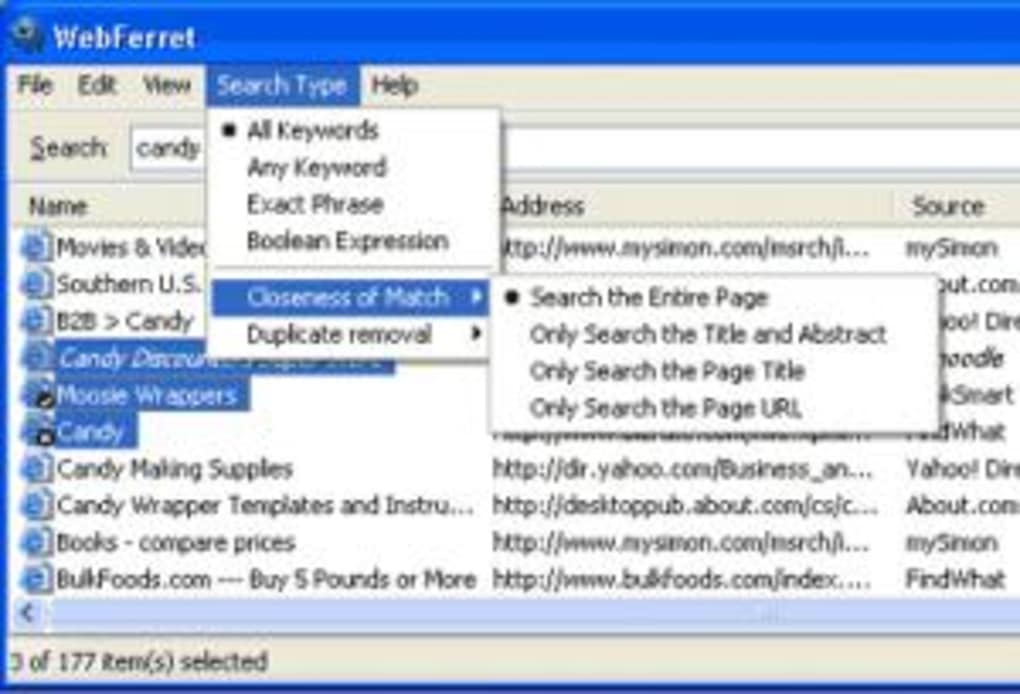
- Simple UI: An uncluttered interface with a single input field and clear result panes, optimized for Windows 98’s classic look.
- Free & No Ads: Completely free to use with no hidden fees or intrusive advertising, preserving focus on the search task.
These features collectively make WebFerret Free a practical tool for anyone who needs to cross‑reference information quickly. The ability to customize the engine list is particularly valuable for professionals who rely on specialized databases, while the export function simplifies reporting and documentation. Because the application runs on legacy Windows versions, it fills a niche that modern browsers often overlook, offering a dedicated search hub that does not demand the resources of a full‑blown web browser.
Installation, Usage & Compatibility
Compatible Operating Systems: Windows 98, Windows ME, Windows 2000, and earlier Windows releases.
Installing WebFerret Free is straightforward. After downloading the installer from a trusted source, double‑click the WebFerretSetup.exe file. The wizard guides you through a three‑step process: accepting the license agreement, choosing an installation folder (the default path is C:\Program Files\WebFerret), and completing the copy of files. Because the program is designed for older Windows platforms, it does not require .NET Framework or additional runtime libraries, which speeds up the setup on machines with limited storage.
Once installed, launch WebFerret Free from the desktop shortcut or the Start menu. The main window presents a single text box at the top where you enter your query. Below the input field, a row of checkboxes represents the enabled search engines.
By default, Google, Bing, and Yahoo are selected, but you can add more engines via the Settings → Engine Manager menu. After typing your keyword and pressing Enter or clicking the Search button, the application dispatches the request to each selected engine in parallel. Results appear in separate panes, allowing you to compare snippets, URLs, and rankings instantly.
For power users, WebFerret Free offers a few hidden shortcuts: pressing Ctrl+R refreshes the current set of results, while Ctrl+H opens the search history window. Exporting results is as simple as clicking the Export button and selecting the desired format. The exported file includes the original query, a timestamp, and a list of URLs from each engine, making it ideal for academic citations or market research reports.
Because the software is not actively maintained beyond its 2007 update, you may notice occasional SSL warnings when querying modern HTTPS sites. However, the core functionality remains reliable for standard keyword searches, and the lightweight nature of the program ensures that even older hardware can handle multiple simultaneous queries without slowdown.
Pros, Cons, FAQ & Final Verdict
Pros
- Free and ad‑free, eliminating cost barriers and distractions.
- Runs on legacy Windows versions, extending the life of older PCs.
- Very small download size (under 2 MB) and quick installation.
- Simultaneous multi‑engine search saves time and reduces repetitive typing.
- Export capability supports offline analysis and sharing.
Cons
- No native support for macOS, Linux, Android, or iOS platforms.
- Interface reflects an older Windows aesthetic, which may feel dated to modern users.
- Last updated in 2007, so some newer search engine features (e.g., voice search) are unavailable.
- Potential SSL compatibility warnings with newer HTTPS sites.
- Lacks advanced filtering options such as safe search toggles per engine.
WebFerret Free remains a solid, no‑cost solution for users who need to pull data from several search engines at once, especially on older Windows machines. While the UI feels retro and the software isn’t updated for modern web standards, its core purpose—consolidated searching—still works reliably. For anyone managing a legacy workstation or looking for a simple meta‑search tool without a subscription, WebFerret Free offers a surprisingly capable experience.
Frequently Asked Questions
Can WebFerret Free run on Windows 10?
Yes, the program can be installed on Windows 10, but because it was designed for Windows 98, some visual elements may appear out of place, and SSL warnings might appear when accessing HTTPS sites.
Is there a way to add custom search engines?
Absolutely. Open the Settings → Engine Manager menu, click “Add New Engine,” and provide the engine’s name and query URL. The new engine will appear alongside the defaults.
Does WebFerret Free store my search queries?
The application keeps a local history of recent queries for convenience, but the data is stored only on your computer and is not transmitted to any external server.
Can I export search results to a spreadsheet?
Results can be exported as plain‑text or HTML files. You can then open the HTML file in Excel or import the plain‑text file into most spreadsheet programs.
Is WebFerret Free safe to download?
Yes, when obtained from a reputable source or the official download page, the installer is free of malware and does not bundle unwanted software.
Conclusion – Should You Download WebFerret Free?
For users who still operate on legacy Windows platforms or need a quick, cost‑free way to query multiple search engines without opening dozens of tabs, WebFerret Free delivers a focused solution. Its minimal footprint, straightforward interface, and useful export options outweigh the dated appearance and lack of modern OS support. If you prioritize speed, simplicity, and a no‑cost approach, click the download button below and start consolidating your web searches today.
Download WebFerret Free Now






